
Flow's Attributes
Attributes are a fundamental piece of bot automation.
You can use attributes to store temporary information in your flows.
Attributes play a pivotal role in enhancing the capabilities and functionality of your chatbot within conversational flows. These essential pieces of data serve as the building blocks of personalized and context-aware interactions, enabling your chatbot to understand, remember, and respond to user input effectively. Whether it's storing user data, tracking order histories, or maintaining session context, attributes empower your chatbot to provide a seamless and tailored user experience. In this section, we'll delve into the significance of attributes and how they can be harnessed to create dynamic, intelligent, and user-centric chatbot interactions.
In the bot studio, you have the following attribute categories:
- User defined attributes
- Most used attributes
- System defined attributes
- Uploaded documents attributes
- Uploaded image attributes
- Lead attributes attributes
User-defined attributes
User-defined attributes are really important when you want to get user data or get data from external web services (i.e., Web Requests, AI Tasks, etc).
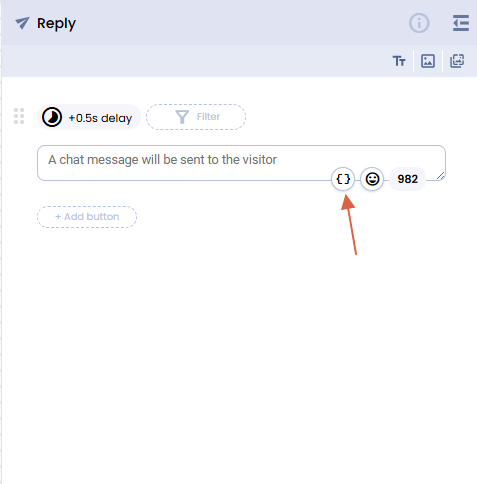
You can define a user attribute simply by opening the {} button available in every place where the use of an attribute is necessary. You can, for example, create a Reply Action and click on the {} symbol on the lower right corner of the text box:
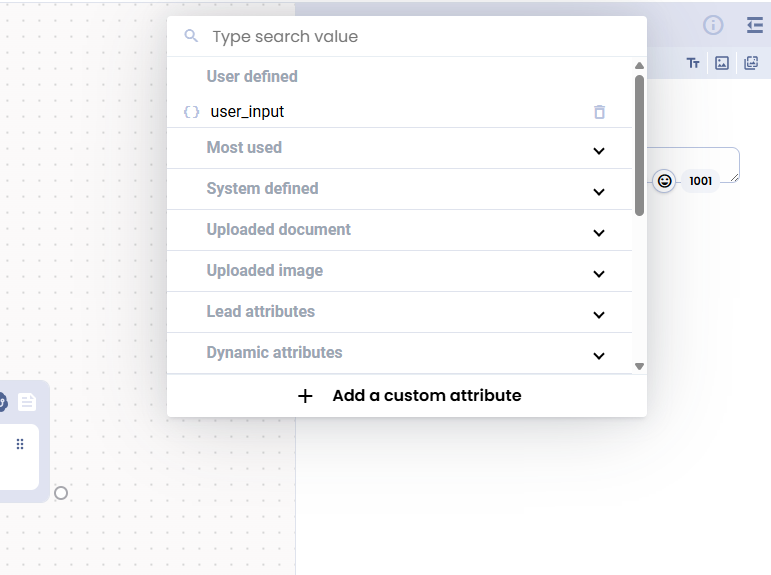
The attributes selector opens.
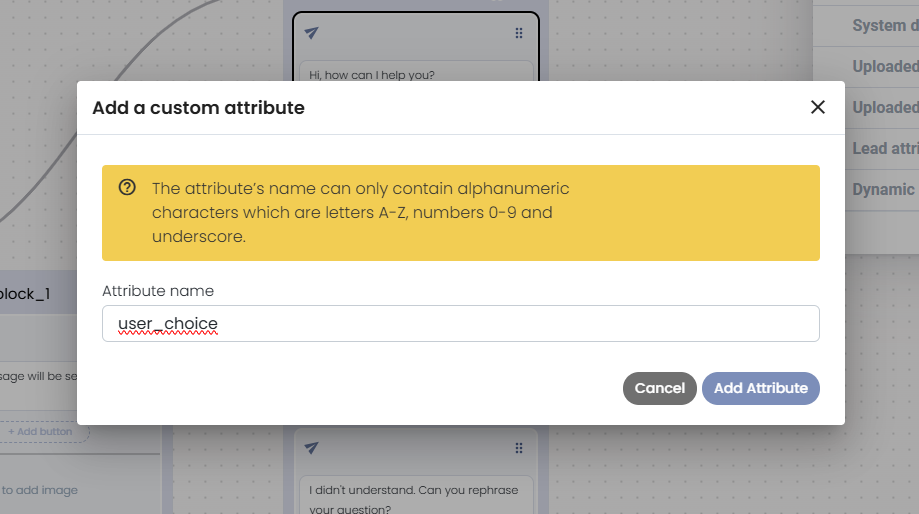
Press the " + Add cutom attribute" button and choose a name for your attribute in the popup
Now the attribute is available in the User-defined section, on top of the Attributes selector popup
Simply click on your attribute, and it will appear in your text flow
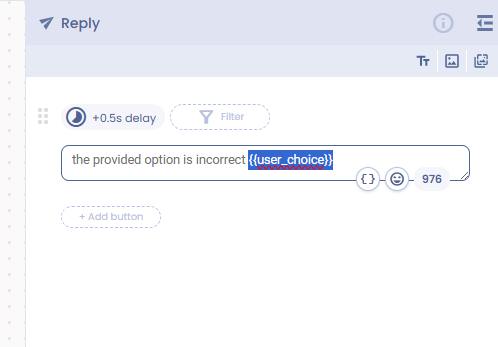
Now, whenever an attribute is available in the flow, it will be rendered in place of the one in double curly brackets in your Reply text.
Most used attributes
The most used category is special attributes, often used inside a conversation.
| Attribute name | Type | Description |
|---|---|---|
| lastUserText | String | The last text the user typed. This is overwritten on each user reply |
| user_country | String | The user Country as decoded by the bot studio |
| user_city | String | The user City as decoded by the bot studio |
| user_language | String | The user language decoded on channel |
System-defined attributes
| Attribute name | Type | Description |
|---|---|---|
| department_name | String | The name of the department where this chatbot is activated |
| department_id | String | The ID of the department where this chatbot is activated |
| project_id | String | The name of the project where this chatbot belongs to |
| last_message_id | String | The unique ID of the last message sent |
| conversation_id | String | This conversation's unique ID |
| chatbot_id | string | This is the bot ID |
| chatbot_name | String | This chatbot name |
| chatbot_token | String | You can use this token to invoke the bot studio APIs. This token is renewed continuously in the flow, and each token will expire in 4 hours from the time you got it in the flow |
| user_id | String | The user's unique ID inside the bot studio database |
| chatChannel | String | The channel where this conversation belongs to. i.e., "web", "wab", "messenger", "instagram" |
| flowError | String | The last error generated in the flow |
Uploaded documents attributes
| Attribute name | Type | Description |
|---|---|---|
| lastUserDocumentAsAttachmentChannel | String | Document channel |
| lastUserDocumentIdentifier | String | Document Identifier |
| lastUserDocumentId | String | Document ID |
| lastUserDocumentName | String | The name of the document uploaded by the user. It's empty if no document is uploaded |
| lastUserDocumentType | String | The type of the document uploaded by the user. It's empty if no document is uploaded |
Uploaded Image Attributes
| Attribute name | Type | Description |
|---|---|---|
| lastUserImageChannel | String | Image channel |
| lastUserImageIdentifier | String | Image Identifier |
| lastUserImageId | String | Image ID |
| lastUserImageName | String | The name of the image uploaded by the user. It's empty if no image is uploaded |
| lastUserImageType | String | The type of the image uploaded by the user. It's empty if no image is uploaded |
| lastUserImageHeight | String | The height in pixels of the image uploaded by the user. It's empty if no image is uploaded |
| lastUserImageWidth | String | The wdth in pixels of the image uploaded by the user. It's empty if no image is uploaded |
Lead Info Attributes
| Attribute name | Type | Description |
|---|---|---|
| currentPhoneNumber | String | The user phone used in the current conversation (i.e., coming from Whatsapp / SMS channels) |
| userEmail | String | The user email in the Contacts module |
| userLeadId | String | The user contact Id in the Contacts module |
| userCompany | String | The user Company name in the Contacts module |
| userFullname | String | The user Fullname in the Contacts module |
Dynamic Attributes
| Attribute name | Type | Description |
|---|---|---|
| timestamp | Number | The current timestamp in millis (Number format) |
| now | ISO date | The current date in the ISODate format. Ex. 2024-09-25T10:14:41.638Z (String format) |
| UUID | String | A dynamic generated UUID obtained from a UUIDv4, removing the dashes |
| UUIDv4 | String | A dynamic standard UUIDv4 |
Updated over 1 year ago